
Leaderboard
-
GlacierIce
Members2Points17Posts -
Mimster
Members1Points3Posts -
chillpad
Members1Points1Posts



Popular Content
Showing content with the highest reputation on 01/28/2023 in Posts
-
1 pointJust a little update. Cutexxx admitted in chat that he is actually from "an African country" and is a scammer looking for money. After he finally admitted that he was indeed a scammer - he asked for money again. You have to give him credit for persistence.1 point
-
Go straight to videochat. I used to set up videochat after several email exchanges. But now I've learned to make it step #1. I met one guy who was completely genuine. He had no problem with video chat, liked the idea of seeing if I was for real too. Two other guys; One never showed up to the chat and I never heard from him again The other pretended to have no access to any device capable of videochat (you can do it for free at the library if you really have a 27 year old phone with no camera like you say). Dont waste your time on the scammers and players. Filter them out from the start.1 point
-
1 pointThis guy said he is an innocent boy located in the UK. I did a websearch of his pic and found the picture that is posted on Houseboy is also on a Sean Cody porn models profile? RichardColton5 ignored me once I sent him the link. It seems that in the past few weeks there has been a huge jump in the number of fake profiles. http://www.fitdudesnude.com/sean-cody-willis1 point
-
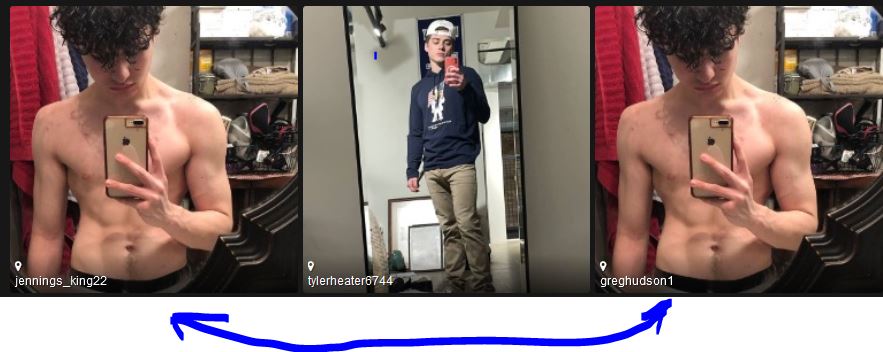
You have to love it when the site makes it easy for you. I haven't messaged with either of them, so could be one or both ( the information in the profiles looks copied as well ) - advise caution when contacting either.
 1 point