Search the Community
Showing results for tags 'houseboy'.
-
Hello! My name is Christian. I currently live in Amarillo, TX. I am an intelligent, funny, good looking, hard-working, very flirty and affectionate submissive. I don't tend to have a Brat streak. Bratting is not a hard requirement, but I very much enjoy it. I am hoping to be a live in houseboy. I am a decent cook, I am good at cleaning (when properly motivated >=D), and a quick learner. I'm open minded, enthusiastic, and love to have fun. Sexually, I am very into giving oral. I have an exceptional talent for it. I also have many kinks that can be discussed. I am a daily Marijuana user. I have gotten to where I mostly only smoke as a reward after I get off of work. At this moment in my life, weed is a nonnegotiable must have. I do like to drink, but would prefer to abstain from alcohol while living together. I will gladly make your drinks for you though . I am masculine presenting 95% of the time, but I am gay in Demeanor and presence. Ideally I would want to relocate to somewhere in a major city or within an hour or so driving. I am also a size queen, though that is negotiable. I am interested in all types of men. I also crave structure (most of the reason I love to brat), so a strict/semi strict routine is preferred. Although, I would like to have time for myself as well. I play piano and write music so an hour a day for that would be nonnegotiable. I am open to connections! Please reach out on snapchat or telegram (my messages aren't working here). I look forward to hearing from you, Sir! Snapchat: Christianbarthl Telegram: christianb492 PS, no maga, no conservatives, and no cops

-
Hello there. I am currently looking for a new opportunity as an active houseboy. I’m someone who genuinely enjoys being productive and staying busy, so if you have a household that needs consistent upkeep and a dedicated set of hands, I’d love to connect. What I Bring to the Table: Active Work Ethic: I prefer roles that keep me on my feet—whether it’s deep cleaning, organizing, or managing daily chores. Reliability: I take pride in being dependable and thorough in my work. Adaptability: I’m comfortable following a specific routine or taking initiative on projects that need attention around the house. Let’s Connect If you are currently hiring or looking for someone to help manage your home, please take a moment to read through my bio for more details on my background and what I’m looking for. If it sounds like a good fit, send me a message! I’m happy to discuss how I can help make your life easier and your home run smoother. Looking forward to speaking more, Doug
-
Hello! I’m looking for a live in either permanent or part time work position. I can cook and clean. Prefer someone who is more of a dominant master than just an employer. If you are real feel free to message me I can FaceTime and have more photos.
- 6 replies
-
- 2
-

-
- domestic services
- bottom
- (and 3 more)
-
real, laidback couple in Denver looking for a true houseboy to serve our needs. we have a home and a good life and need a boy to complete it
-
Please message if after a fit younger houseboy x VID-20241005-WA0008.mp4
-
I live in Florida south Florida black guy 36. Youth ful looking 5ft11. 165lbs. Caramel brown skin. looking for a houseboy to get to know and also become a friend to. I am seeking someone down to earth easy going respectful who doesn't mind helping around the house. This can be temporary or permanent. As well as pleasing me sexually but sexually I only like something called Frottage or frot frot means humping dick to dick laying on each other facing one another humping until we cum in missionary position facing one another humping until we cum. I like feeling the guys body on top of mine facing one another humping until we cum i love when the guy can cum that way. I do not like anal sex not my thing. So bottoms need not to apply. Because I am not looking to do u up the butt nor do I want a bj. I'm not a top or a bottom. I am a side. Means someone who isn't into penetration at all. I like otter type guys hairy furry guys are a huge turn but smooth is ok. Guys who are heavy cummers is fun. Low hanging balls is turn on. Thick dick is a turn as well. But all isn't a must. Looking for a house boy who enjoy frot fun. Jo fun. Safe fun must be std free like myself looking for a house boy who can watch movies with me. Must enjoy watching tv n movies. Music lover, also would be great to find someone who can play musical instruments like a guitar i have one but I can't play it , want to find some one who can play it for me. If this works out u can get your own room. Free food. Maybe a free trips to Disney n universal studios cause I go there alot. not sure about allowance yet maybe unpaid position. Just a free room n free food. Gifts here n there. Help around the house all states welcome to contact me. Any race is fine. Looking to get to know you first not looking to rush things

-
I live in Florida south Florida black guy 36. Youth ful looking 5ft11. 165lbs. Caramel brown skin. looking for a houseboy to get to know and also become a friend to. I am seeking someone down to earth easy going respectful who doesn't mind helping around the house. This can be temporary or permanent. As well as pleasing me sexually but sexually I only like something called Frottage or frot frot means humping dick to dick laying on each other facing one another humping until we cum in missionary position facing one another humping until we cum. I like feeling the guys body on top of mine facing one another humping until we cum i love when the guy can cum that way. I do not like anal sex not my thing. So bottoms need not to apply. Because I am not looking to do u up the butt nor do I want a bj. I'm not a top or a bottom. I am a side. Means someone who isn't into penetration at all. I like otter type guys hairy furry guys are a huge turn but smooth is ok. Guys who are heavy cummers is fun. Low hanging balls is turn on. Thick dick is a turn as well. But all isn't a must. Looking for a house boy who enjoy frot fun. Jo fun. Safe fun must be std free like myself looking for a house boy who can watch movies with me. Must enjoy watching tv n movies. Music lover, also would be great to find someone who can play musical instruments like a guitar i have one but I can't play it , want to find some one who can play it for me. If this works out u can get your own room. Free food. Maybe a free trips to Disney n universal studios cause I go there alot. not sure about allowance yet maybe unpaid position. Just a free room n free food. Gifts here n there. Help around the house all states welcome to contact me. Any race is fine. Looking to get to know you first not looking to rush things
-
Hello, 28 yo in San Diego, CA seeking to become a houseboy. Ideally looking for a long-term role with someone who is clean and trustworthy. I am ok with couples. I am looking to come to you (room & board) and am open for allowance also. I enjoy a wide range of activities both in-home and outdoors (hiking, movies, sightseeing) and consider myself friendly and respectful. For room and board I am open to help you around the home and experienced in gardening and pool/house maintenance. I am good looking, fun, charismatic, and health oriented, and prefer similar personalities. My stats are 5'10 150# asian/blk/wht mix. I am open to intimacy if chemistry is right. Feel free to message me for cell/email for photos and further details. Thanks
-
Hey I’m about to be 24 years old. Living in my van and with friends in San Diego. I really need a break from SD. If anyone wants a good looking and out going guy to house and do fun activities with. That’s me! If you have any questions, please reach out
-
Hey guys, haven't been online for quite some time. I'm looking to relocate to the UK on a semi permanent or permanent basis. Looking for a live in employer. Also don't mind couples (certainly have the libido for it). Can do most types of work and can learn the remaining ones. I'm a bottom and more than open to experimenting. If I have a choice I'd have sex a few times a day lol. Don't hesitate to message if interested. I'm very communicative and have never turned down the chance to chat with someone.
.thumb.jpg.528deaea69dee56502f7a1e97d5dcf70.jpg)
-
I’m in my mid 20’s and I’ve been wanting to have a mentor who wants to have a companion on his business trips, a travel partner on his vacations, a sex partner, or simply a great listener to talk to whenever. Ultimately, I’d love to learn all that I can from them especially: networking, traveling, and socializing. What was your journey that led you to desire for a houseboy relationship?
-
I am ready to start a new life as a permanent live in houseboy. I am college educated and looking for the right dominant top to live with. I am beautiful blue eyed 6 foot 1 and have a world class bubble butt. please text me for more information and my photos. (719)210-0283
-
28 year old (look younger) professional w college degree looking for live-in houseboy position with right older guy. Maybe my last chance for a long-term position before the end of my 20s. Inquire to learn more happy to share photos, interests and other details.
-
Houseboy here looking for the right employer. Submissive, obedient loyal boy. Willing to do all take care of the home as well as owner with pleasure and gratitude
-
Hey Guys, I'm new to this site, and liking what I'm seeing. Im based in New York City (when the world isn't on fire) and love/am open to travel. I have significant expirience as a passionate bottom (HIV- and Disease Free - so no need to worry). I love a strong guy who loves topping my muscled ass (bike 20 miles a day, gym 5 days a week, professional dancer) and love being able to make him cum as often as he needs. Im open to a romantic endeavor - but I'm also open to a business relationship where I service you how you need. I'm incredibly organized, an avid cook from Korean BBQ to Vegan Pizzas to Rosemary Chicken and Potatoes and detail oriented. Can play host for you and your friends and then become a pass around party bottom. No drugs stronger than poppers and generally only drink when going out. Ill try anything once, and some things twice. Very into chatting and messaging currently - and meeting once things are safe. Im a smooth fit boy just looking for my daddy. Hit me up whenever.
-
My partner and I are seeking a boy who is comfortable in a poly relationship. We are open and honest, very stable. We've been together 26 years and have had various companions over the years. Were looking for someone under 35 and compatible with our life. Email so we can chat and get to know one another.
-
Hi All, I'm Josh, 28 living in Birmingham (without the horrible accent) haha Interested in chatting with people to see where it leads.
-
Mid thirties sub bottom houseboy looking for full time living accommodation, currently in London but happy to relocate.
-
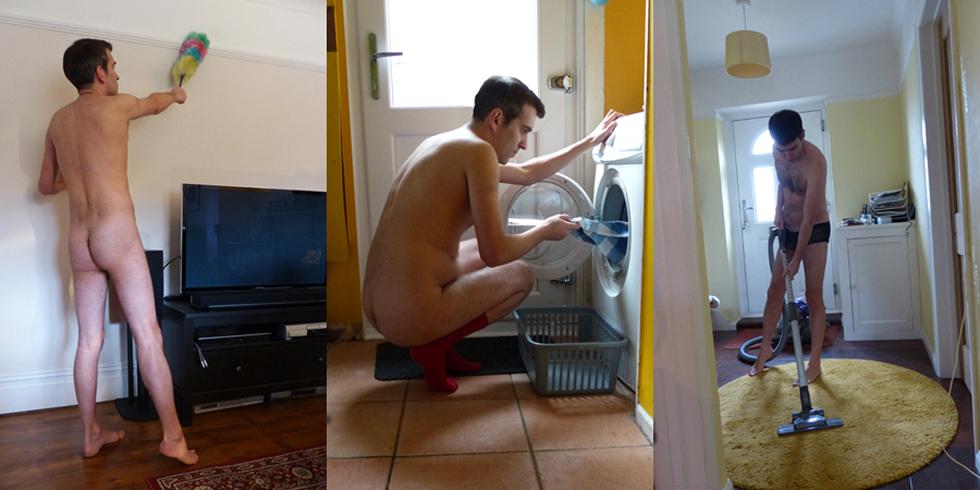
Hi Guys! My name is Joe Galea and I live in Bristol in the UK. I am a very friendly, intelligent, relaxed and ultra open minded guy offering you a number of services. Houseboy Service Cleaning, Cooking, Ironing, Washing etc - naked, in underwear or in whatever you wish me wear Massage I'm an experienced masseur offering a very sensual and erotic, full head to toe, body massage. I offering a relaxing gentle touch, using my whole body. I also use many tantric methods to maximise your blissful experience. I am happy to travel across the UK to offer you this service. Check out my web page for more and for those all important testimonials. More on my unique massage service Life Model I'm an experienced life model and happy to pose nude or in any fetish gear you wish. Draw me, paint me, video me, photograph me! Stripper I offer a burlesque style Striptease - either one to one, for couples or for large groups. I have a number of costumes I strip from including: Schoolboy, Geek, Suited, Sailor and Cowboy. Party Organiser and Sexual Event Organiser I run a company called Golden Guys, based in the West of England. The group offers naked and orgy type events, sexual educational events such as Massage, visiting various fetishes and how to have better sex with your partner. I also have tantric experience. Happy to offer to create these events in the UK & Ireland. For those living in the West of England here is the site: Golden Guys So, that's me Joe Galea - ready to serve! Naked DJ I am an experienced DJ, working in gay venues across the South West, London, Brighton and Manchester. Have DJ'd naked for tantric events in the past. Office Boy I am an experienced administrator, with many administration and business qualifications including an NVQ Level 3 in Admin & Business So... once again! I'm Joe Galea - willing and ready to serve!
-
It can be a regular but it needs to be mutual
-
I’m new to this and looking for some advice/direction in life. I feel like my sexual needs will determine my hunger for the work. I want to be independent from my parents so financial advice is needed. I have many more questions but would rather chat privately
-
Ggood-looking Boca Raton Florida couple looking for house point to come and enjoy our lives with us. must love dogs we have three and also must take care of the house and the dogs. The only wrong business so there is opportunity for extra work. we are too nice guys and both looking. Occasional friend would be fine too but really looking for someone to live with us send email or text
-
Seeking HB in the Bay area. You should either be living in the US or have a visa to move to the US. Ages 18-35 welcome to apply. Prefer early 20s to late 20s. Ideal HB is good looking, with good work ethic for house work. If you can start right away that would be ideal.
-
Nicomedes has a 4-bedroom apartment in Spain, with a balcony overlooking the Mediterranean, and easy beach access. He plans to rent out temporary bedrooms to gay and bi tourists. He wants a houseboy to attend the guests and clean up after them, to take care of all kitchen clean-up promptly, to clean the bathrooms weekly and as needed, to do laundry as needed, and to clean the whole place once a month. The relationship between employer and boy will probably be non-sexual. The houseboy will have his own room, rent-free, and will have complete access to all the food in the kitchen. Employer will do most of the grocery shopping, and will sometimes cook for both. Houseboy will receive no money from employer, and may earn spending money outside the apartment, probably as a trainer or dancer. He may not solicit tips from guests, although if they wish to tip him discreetly, that is their business. He must speak at least some Spanish and English. Employer is an American teacher and travel consultant, 70 years old, bi/gay, and speaks 5 European languages. Houseboy should be under 35 y.o., and have a hairless body with a stocky, muscular build (165-180 cm.), and a clean-shaven face. He will perform his duties in revealing clothing, in gymwear, sometimes in underwear, perhaps sometimes nude. Mannerisms must be masculine, but his 'scene' is not set in stone -- Employer is open to several possibilities. [Nicomedes of Bithynia was the erastes - mature gay lover - of an eromenes - teen gay lover - of a Roman patrician named Gaius Julius Caesar. Later in life, as a fabled womanizer in Rome, Caesar disliked the nickname 'Queen of Bithynia' which his soldiers teased him with, but it was only mild joshing, not serious abuse -- serious homophobia had not yet set in.] Interested boys should send one face-photo and at least 2 reavealing body photos (front and back) to Nicomedes at this site.

-
I have been serving 24/7 for six of the last 10 years in a number of households starting my late 40s. while a lot of doms want a young pretty pliable sub with a nice body. many of them open up their demographic focus after some pursuit & experience. about a third of my masters have been younger than me. what doms report to me that they don't like about some younger guys: they're flaky and often disappear for no reason while they're getting to know each other they don't know what they want they are inexperienced in sex & kink & D/s they have poor judgment & impulse control they spent most or all of their time on their phone or gaming, hide in their room they need nagging to do any chores they do drugs & steal their profile is blank/hard to evaluate and/or they didn't read our profile they have more STIs than guys over 30 obviously none of those things are true of all young men or can't be true of older guys what masters have told me they enjoyed about me or other older experienced subs: we're trained we are motivated & know that we want to serve we're very skilled at bottoming, cock sucking, massage etc we know how to take care of a household/dungeon/car etc we often have useful life skills or input when there's a problem we do obvious chores without having to be told or threatened we're more interesting to be around, make conversation, introduce to friends we can be trusted to follow thru on a project and have good independent judgment we're more hairy, chunky, mature, masculine, better tops we don't need constant supervision or entertainment most of the doms i've met who were serious about finding a houseboy have been ripped off by a young pretty drug addict who seduced them to the point where they got off balance & did things against their own better judgment some doms who can handle more than one sub, keep a young guy as a boytoy & an older guy as a manwife or majordomo what's your experience of looking for guys of different ages & being served by them?










.thumb.jpg.e60666cb972dbdf26cef33ee3642b49c.jpg)
.jpg.44b41a54fec85af71b8459681b2b994e.jpg)